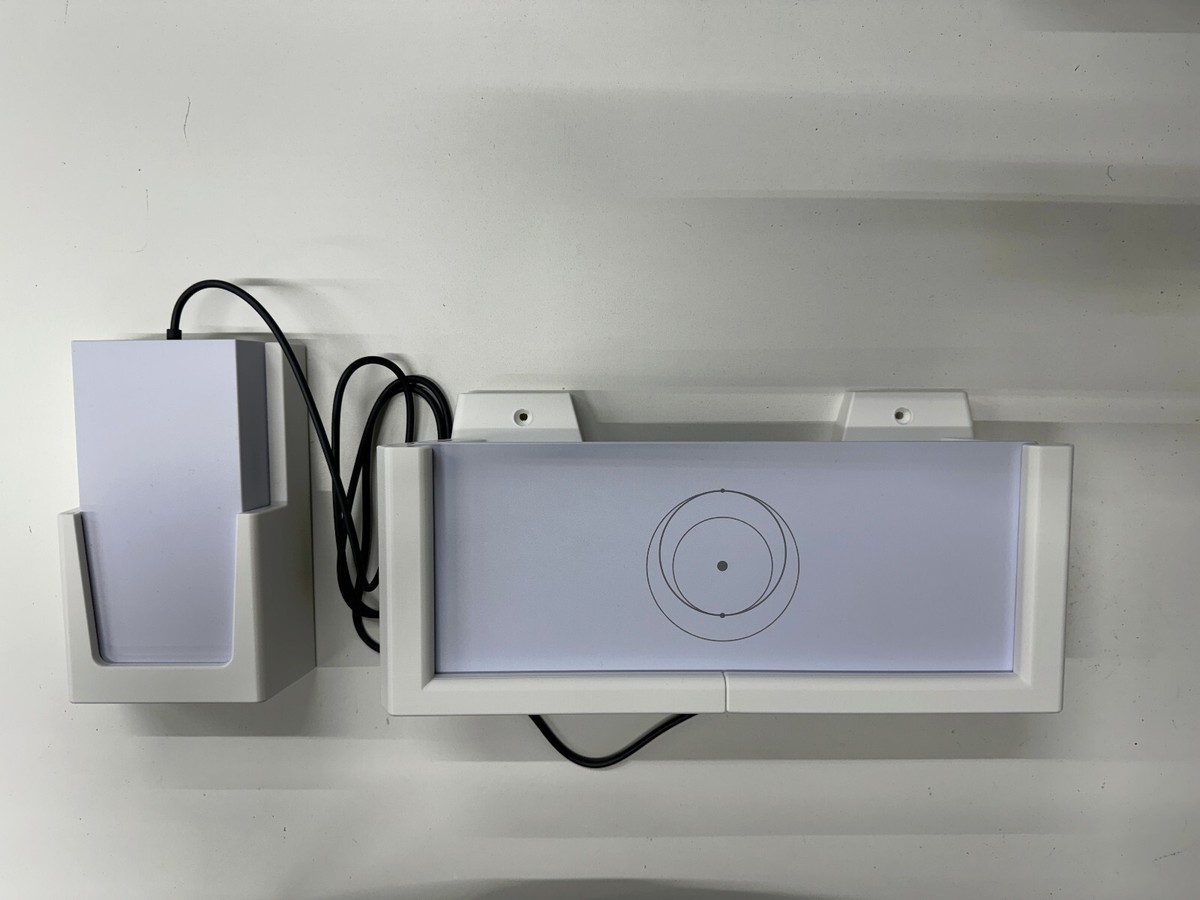
Starlink Gen 3 Router Mount
Starlink Gen 3 Router Mount Kenya price & specs. Secure your Gen 3 router neatly on walls with genuine mounts from Starlink Kenya Installers.
KES 28,000.00
KES 33,000.00
Product Details
Starlink Gen 3 Router Mount in Kenya – Complete Product Guide
Starlink Kenya Installers
What is the Starlink Gen 3 Router Mount?
The Starlink Gen 3 Router Mount is an official mounting accessory designed specifically for the Starlink Gen 3 Wi-Fi 6 Router. It allows users to securely mount the router directly onto a wall or other flat surface for cleaner cable management, improved organization, and better space utilization.
Unlike placing the router on desks, shelves, or floors where it may consume space or risk accidental movement, the Router Mount provides a secure and professional installation solution. Once installed, the Gen 3 router snaps firmly into place, while integrated cable retention helps prevent cables from accidentally disconnecting.
The mount is ideal for homes, offices, mobility setups, server rooms, schools, retail shops, and businesses where organized networking installations are important. At Starlink Kenya Installers, we provide genuine Starlink networking accessories together with professional router mounting, cable management, and Wi-Fi optimization services across Kenya.
Starlink Gen 3 Router Mount Price in Kenya (2026)
| Item | Price Range (KSh) | Description |
|---|---|---|
| Starlink Gen 3 Router Mount | 8,000 – 18,000 | Official router wall mount |
| Professional Router Installation | 3,000 – 10,000 | Router mounting & cable routing |
| Full Network Setup Package | 15,000 – 45,000+ | Router setup & Wi-Fi optimization |
| Cable Management Accessories | 2,000 – 8,000 | Clips, conduits & cable protection |
Some Kenyan suppliers currently list the Gen 3 Router Mount for approximately KSh 45,000 including shipping and handling.
What Comes with the Starlink Gen 3 Router Mount?
| Component | Description |
|---|---|
| Router Mount | Main wall mounting bracket |
| 2x Screws | Secure wall attachment |
| 2x Drywall Anchors | Stable mounting support |
| Cable Retention System | Prevents accidental disconnections |
The official mount is designed specifically for the Starlink Gen 3 Router.
Key Features & Technical Specifications
| Feature | Specification |
|---|---|
| Compatibility | Starlink Gen 3 Router |
| Mount Type | Wall & flat-surface mount |
| Installation Type | Indoor mounting |
| Cable Retention | Integrated cable security |
| Material | Durable reinforced polymer |
| Package Weight | 0.34 kg |
| Package Dimensions | 250 × 165 × 85 mm |
The Router Mount is engineered for organized networking deployments and space efficiency.
Starlink Gen 3 Router Mount Installation
Why Choose the Starlink Gen 3 Router Mount?
| Advantage | Benefit |
|---|---|
| Cleaner Installation | Reduces clutter and improves organization |
| Space Saving | Frees desk and shelf space |
| Secure Router Placement | Prevents accidental movement |
| Better Cable Management | Organized cable routing |
| Professional Appearance | Clean networking setup |
Why Buy from Starlink Kenya Installers?
- Genuine Starlink networking accessories
- Professional router installation support
- Structured cable management solutions
- Wi-Fi optimization guidance
- Fast delivery across Kenya
- Reliable after-sales support
With Starlink Kenya Installers, users receive authentic accessories together with expert setup assistance for reliable long-term networking performance.
Router Mount vs Desk Placement
| Feature | Router Mount | Desk Placement |
|---|---|---|
| Space Efficiency | Excellent | Moderate |
| Cable Organization | Better | Limited |
| Accidental Movement Protection | High | Moderate |
| Professional Appearance | Excellent | Basic |
| Best Use Case | Organized installations | Temporary setups |
The Router Mount is ideal for users who want clean and professional Starlink networking installations.
Best Use Cases in Kenya
| Use Case | Why It Works Well |
|---|---|
| Homes & Apartments | Saves space and improves organization |
| Offices & Businesses | Professional network deployment |
| Retail Shops | Cleaner installations |
| Schools & Institutions | Organized networking environment |
| Mobility Installations | Better space utilization |
| Server Rooms | Structured cable management |
The Router Mount is especially useful in environments where clean installations and cable organization are important.
FAQs – Starlink Gen 3 Router Mount Kenya
1. What is the Starlink Gen 3 Router Mount used for?
It securely mounts the Gen 3 router onto a wall or flat surface.
2. Is it compatible with all Starlink routers?
No. It is specifically designed for the Gen 3 Router.
3. Does it save space?
Yes. It helps free desk and shelf space.
4. Does it improve cable management?
Yes. It includes cable retention support for cleaner installations.
5. Is installation difficult?
No. It is easy to install using the included hardware.
6. Does it include mounting hardware?
Yes. It includes screws and drywall anchors.
7. Is it suitable for offices?
Yes. It is ideal for organized office networking setups.
8. Can it be mounted on drywall?
Yes. Drywall anchors are included.
9. Is professional installation recommended?
Yes, especially for cable routing and network optimization.
10. Where can I buy it?
From Starlink Kenya Installers.
Watch the Starlink Gen 3 Router Mount in Action
The Starlink Gen 3 Router Mount is designed for users who want a cleaner, more organized, and professional networking setup. The video above demonstrates how the mount securely holds the Gen 3 Wi-Fi 6 router while improving cable management and reducing clutter in homes and offices.
One of the biggest advantages of the Router Mount is its space efficiency. By mounting the router directly onto a wall or flat surface, users can free up desk space while reducing the chances of accidental cable disconnections or router movement.
With support from Starlink Kenya Installers, users can ensure proper router placement, optimized Wi-Fi coverage, and professional cable management for reliable long-term Starlink networking performance across Kenya.
The Starlink Gen 3 Router Mount is an essential accessory for users who want organized, space-efficient, and professional Starlink networking installations in Kenya. Its secure mounting system, cable retention support, and clean installation design make it ideal for homes, offices, businesses, and mobility setups.
For genuine Starlink networking accessories, expert installation guidance, and reliable after-sales support, trust Starlink Kenya Installers. Visit starlinkkenyainstallers today and upgrade your Starlink Gen 3 setup with professional-grade networking and cable management solutions.